Etude

練習のすべてを、ひとつに。

All your practice, in one app.

楽譜の再生、テンポ調整、A-Bループ、音源の加工、譜面への書き込み、チューナー、メトロノーム。 アプリを切り替えるストレスから解放されるための、ひとつのアプリ。

Score playback, tempo control, A-B loop, audio processing, score annotation, tuner, metronome. One app to free you from constantly switching between tools.

無料でダウンロード Download Free 機能を見る See features

iPhone & iPad · iOS 16+ · アカウント不要 · 完全オフライン

iPhone & iPad · iOS 16+ · No account required · Fully offline

練習中、5つのアプリを行き来していた。

During practice, I was juggling 5 different apps.

WHO IT'S FOR

こんな練習に、静かに寄り添う。

A quiet companion for every kind of practice.

レベルもジャンルも違う、それぞれの練習スタイルに。どのケースでも、必要な機能だけが手元に揃う設計です。

Whatever your level, whatever your genre. The right tools, always within reach.

初心者・趣味のピアノ

Beginner / Hobby Pianist

テンポを落として、ゆっくり始めたい

Slow it down. Start gently.

原曲のテンポでは追いつけないフレーズも、50%まで落として聴けば耳と指が追いつきます。音名表示で読譜の不安を補いながら、苦手な4小節をループで体に入れていきます。

Bring fast passages down to 50% and let your ears and fingers catch up. Note name overlays support sight reading, and A-B loop drills the four bars you can't quite play.

テンポ可変Tempo A-BループA-B Loop 音名表示Note Names カーソル追従Cursor Follow

アカペラ・合唱

A Cappella / Choir

自分の声部だけを抽出して、暗譜したい

Isolate your part and memorize it.

SATBの譜面を開いて、自分以外のパートをミュート。バックグラウンド再生に対応しているので、家事をしながらでも自分のパートを耳に染み込ませる練習ができます。

Open an SATB score, mute every part but yours. Background playback keeps it running while you cook, walk, or stretch — your part settles into your ear naturally.

パートミキサーPart Mixer バックグラウンド再生Background Play A-BループA-B Loop

吹奏楽部・ベテラン

Wind Ensemble / Experienced

合奏イメージのまま、個人練を仕上げたい

Practice solo, in the ensemble's voice.

Bb / Eb / F の移調楽器の譜面もそのまま読み込めます。全パートを鳴らしながら自分のパートを強調、メトロノームを併用して合奏前の最終確認を仕上げます。

Bb / Eb / F transposing scores load as-is. Boost your part within the full mix, lock in with the built-in metronome, and walk into rehearsal ready.

移調楽器対応Transposition パートミキサーPart Mixer メトロノームMetronome チューナーTuner

耳コピ・DTM志向

Transcribers / Bedroom Producers

音源を加工しながら、譜面に起こしたい

Manipulate audio. Transcribe.

手持ちのMP3やWAVを取り込んで、ピッチとテンポを独立して変更。早すぎるソロは速度を落とし、必要なパートだけトリムで切り出して、コードを自動検出しながら採譜を進めます。

Import MP3 or WAV. Change pitch without changing tempo, slow fast solos, trim the parts you need, and let chord auto-detection guide your transcription.

音声ピッチ変更Pitch Shift 音声テンポ変更Time Stretch トリムTrim コード自動検出Chord Detect

レッスン受講者

Lesson Students

先生の演奏動画を、自分のテンポで学びたい

Learn from your teacher's video, at your own pace.

録画したレッスン動画から音声を抽出してEtudeに取り込み。スロー再生でフレージングを確認しながら、譜面に書き込みでメモを残す。繰り返し再生で、先生のニュアンスを身体に入れていきます。

Extract audio from your recorded lesson, drop it into Etude, slow it down, and annotate the score with what your teacher said. Loop it until the nuance lives in your body.

動画インポートVideo Import 音声テンポ変更Time Stretch A-BループA-B Loop 書き込みAnnotation

クラシック演奏家

Classical Performer

細部まで作り込んで、本番に持っていきたい

Polish every detail. Walk on stage ready.

譜面表示を細かく調整して読みやすく整え、書き込みで運指やフレージングを記入。エフェクトとEQで自分の録音を整え、ピアノロールで音符の重なりを俯瞰しながら解釈を深めます。

Tune the score layout to your eye. Annotate fingering and phrasing. Shape your own recording with effects and EQ. Use piano roll to see how voices interlock.

譜面表示調整Layout Tuning 書き込みAnnotation 録音モードRecording ピアノロールPiano Roll

SCORE PLAYBACK FREE

譜面を開けば、そのまま音になる。

Open a score. It plays.

.mscz / MusicXML / MIDI を Files から直接読み込み。MuseScoreからのエクスポート不要、形式変換も不要です。

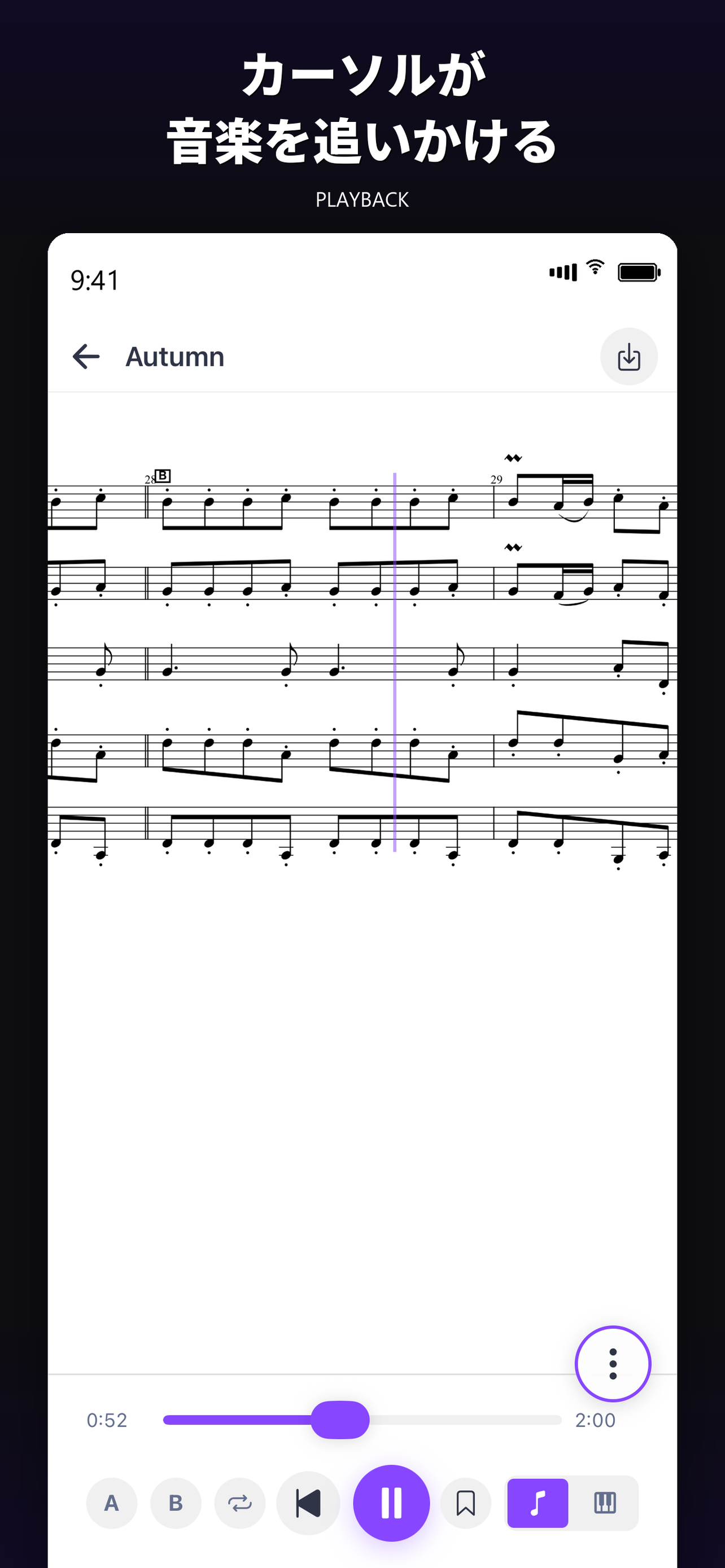
譜面を開いた瞬間に全パートが鳴り、再生位置にカーソルがリアルタイムで追従します。128種類のGM音源で、各パートに楽器を割り当てて聴くこともできます。

Open .mscz / MusicXML / MIDI directly from Files. No MuseScore export, no format conversion required.

The moment you open a score, every part starts to sound. A cursor follows the playhead in real time. Switch instruments freely from 128 GM tones.

これでできることWhat this enables

譜面を渡された日に、全パートが鳴った状態の音をすぐに聴けます。まずEtudeで開いて全体像を掴むという練習ルーティンが作れます。

Hear the full ensemble the moment you receive a score. A new ritual: open in Etude first, grasp the whole, then drill the parts.

Score playback screen

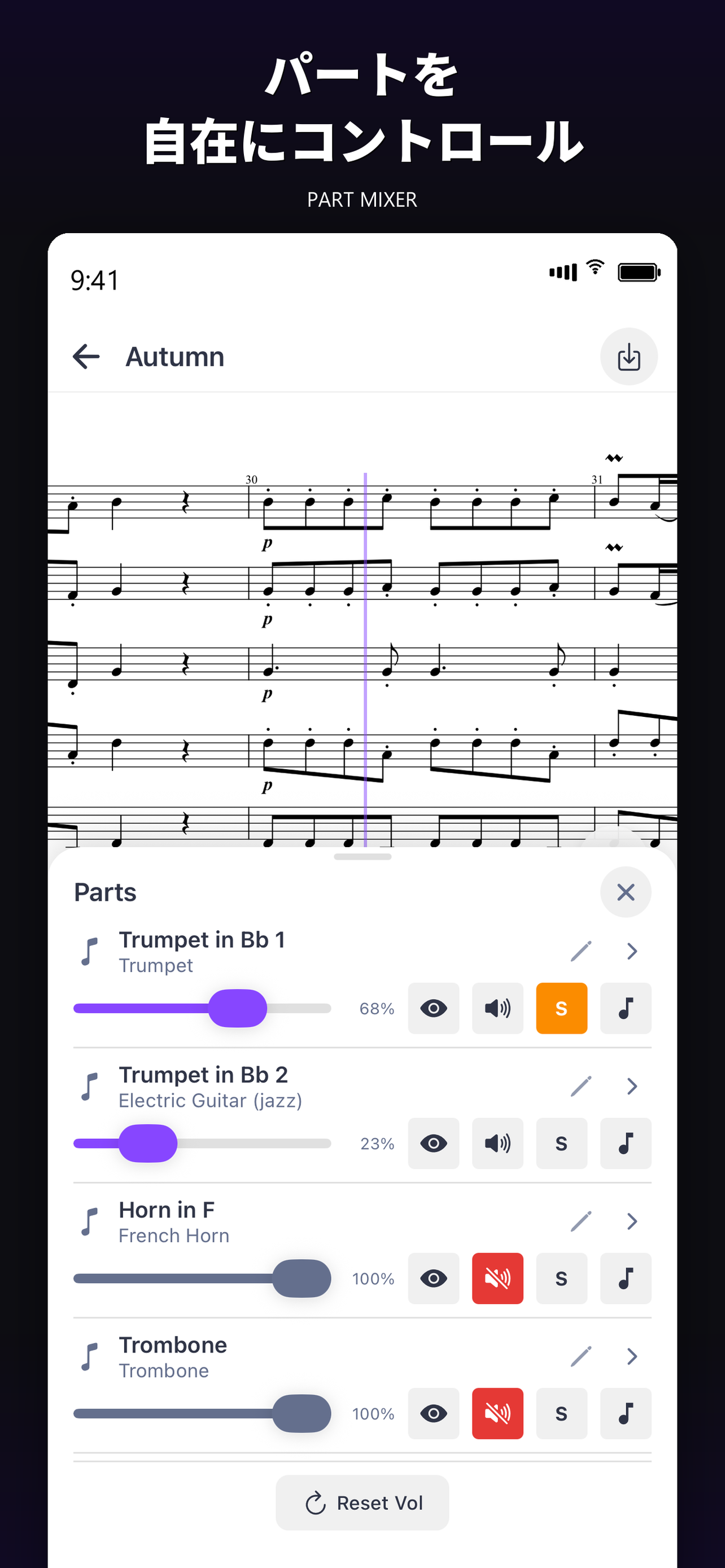
PART MIXER FREE

聴きたいパートだけ、静かに残す。

Keep only the parts you need to hear.

各パートのソロ・ミュート・音量を個別に調整できます。合唱のSATB、吹奏楽の各セクション、ピアノの両手など、譜面の構造に応じて自由に組み替えられます。

自分のパートをミュートして他を聴く。逆に自分のパートだけソロにして練習する。他のパートだけ小さく鳴らして自分が前に出る感覚を作る。

Solo, mute, and adjust volume per part. Choir SATB, wind ensemble sections, piano left and right hands — reconfigure freely to match the score.

Mute your own part to listen. Solo your part to drill. Lower the others to feel yourself stepping forward.

これでできることWhat this enables

合唱パート練のために、他の声部だけ残してピアノ伴奏のように鳴らせます。メンバーが集まれない日でも、家で合奏しているような感覚で個人練ができます。

For choir part practice, leave the other voices running like a piano accompaniment. Even when the group can't meet, your home practice feels like rehearsal.

Part mixer screen

TEMPO + A-B LOOP FREE

苦手な4小節を、納得するまで繰り返す。

Drill those four bars until they're yours.

テンポは10〜200%の間で自由に変更できます。50%から始めて慣れたら70%、90%と段階的に上げる練習法に対応します。

譜面上にA点とB点を指定すると、その範囲だけがループ再生されます。テンポを落としたまま回数を重ねれば、フレーズが自然に体に入っていきます。

Tempo flexes freely between 10% and 200%. Start at 50%, climb to 70%, then 90% — the classic graduated approach, fully supported.

Drop A and B points on the score, and that span loops on its own. Slow tempo plus repetition makes the phrase yours.

これでできることWhat this enables

ここの音程が難しいと感じた4小節を、テンポ60%で20回繰り返す。そんな集中練習が、ボタン2つで始められます。

Loop the four hardest bars at 60% twenty times. That deep, focused practice is two taps away.

Tempo and loop view

BACKGROUND PLAYBACK FREE

切り替えても、再生は止まらない。

Switch apps. The music keeps going.

画面をロックしても、別のアプリに切り替えても、Etudeの再生は止まりません。戻ってきたとき、リロード待ちはありません。

譜面を再生しながら別アプリでメモを取る。ロック画面で再生を続けながらストレッチをする。そんな自然な使い方ができます。

Lock the screen. Switch apps. Etude keeps playing. When you return, no reload, no waiting.

Take notes in another app while the score plays. Stretch while it loops on the lock screen. Practice the way you actually live.

これでできることWhat this enables

集中しているフローを、アプリ切り替えのリロードで途切れさせない。地味ですが本質的な体験差が生まれます。

Keep your focus intact. Reloads no longer break the flow. A small change with real, daily impact.

Library screen with background playback

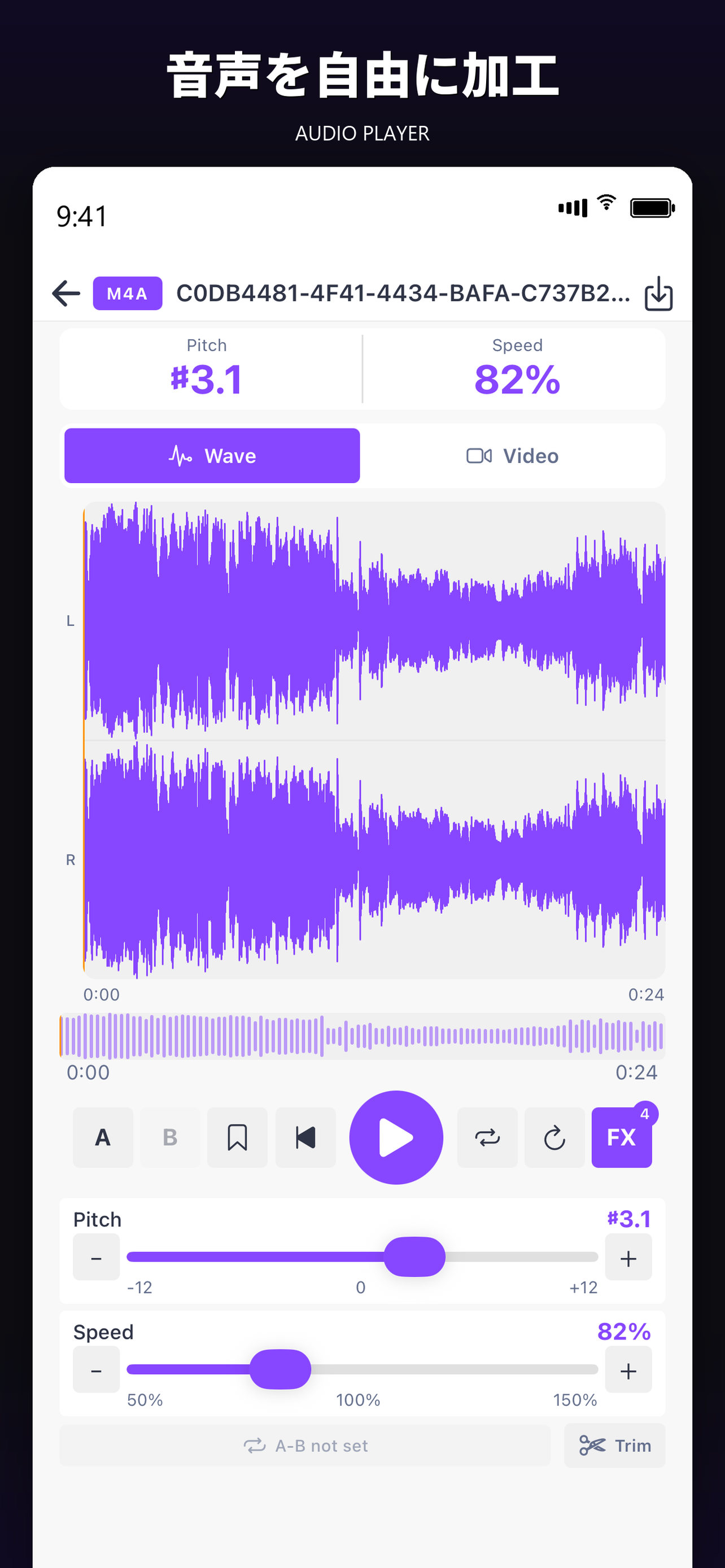
AUDIO PLAYER FREE

音源のピッチとテンポを、独立して変える。

Pitch and tempo, controlled independently.

MP3 / WAV / M4A / FLAC / OGG など主要なフォーマットを読み込めます。ピッチを変えずにテンポだけスローに、テンポを変えずにキーを上げ下げ、両方を独立して制御できます。

波形を見ながらピンチで拡大、A-Bループでフレーズ反復、トリム機能で必要な部分だけ切り出し。参考音源を練習素材に加工するための機能が揃っています。

Loads MP3 / WAV / M4A / FLAC / OGG. Slow the tempo without changing pitch. Transpose without changing speed. Both, independently.

Pinch to zoom on the waveform. A-B loop a phrase. Trim out the bit you need. Turn any reference recording into a practice asset.

これでできることWhat this enables

速いギターソロをキーそのままで70%にスローダウン、難所だけトリムでループ。市販音源を完全な耳コピ素材に変えられます。

Slow a fast guitar solo to 70% in the original key. Trim the hard bars and loop them. Any commercial track becomes a transcription resource.

Audio player with waveform

VIDEO IMPORT PRO

レッスン動画から、音だけ取り出して練習。

Pull audio from your lesson videos.

手持ちのMP4 / MOV動画を取り込むと、音声だけが抽出されてオーディオプレーヤーで使えます。録画したレッスン、参考演奏の動画、教材映像など、動画形式のソースをそのまま練習素材に変換できます。

抽出した音声には、ピッチ変更・テンポ変更・A-Bループ・エフェクトなど、すべての加工機能を適用できます。

Drop in an MP4 / MOV file. Etude extracts the audio and opens it in the player. Lesson recordings, reference performances, course videos — turn any video into practice material.

Once extracted, the audio gets the full toolkit: pitch shift, tempo, A-B loop, effects.

これでできることWhat this enables

先生から送られてきたレッスン動画を、自分のテンポで何度も繰り返して聴き直せます。動画を見るアプリと音を加工するアプリを行き来する手間が消えます。

Re-listen to your teacher's recording at your own pace, as many times as you need. No more bouncing between a video player and an audio editor.

Video import screen

SCREENSHOTS

実際の画面を見る。

See the real screens.

主要な画面のスクリーンショットを並べました。アプリ全体の雰囲気を、実物でご確認ください。

A walk through the main screens. The look and feel of the app, as it actually is.

MORE FEATURES

他にも、練習を助ける道具がそろっています。

Plus, everything else you need.

毎日の練習であったら助かるを、ひとつずつ形にしてきました。一部はEtude Proの機能として提供しています。

Built one by one, for the daily-practice problems we kept hitting. Some are part of Etude Pro.

FREE

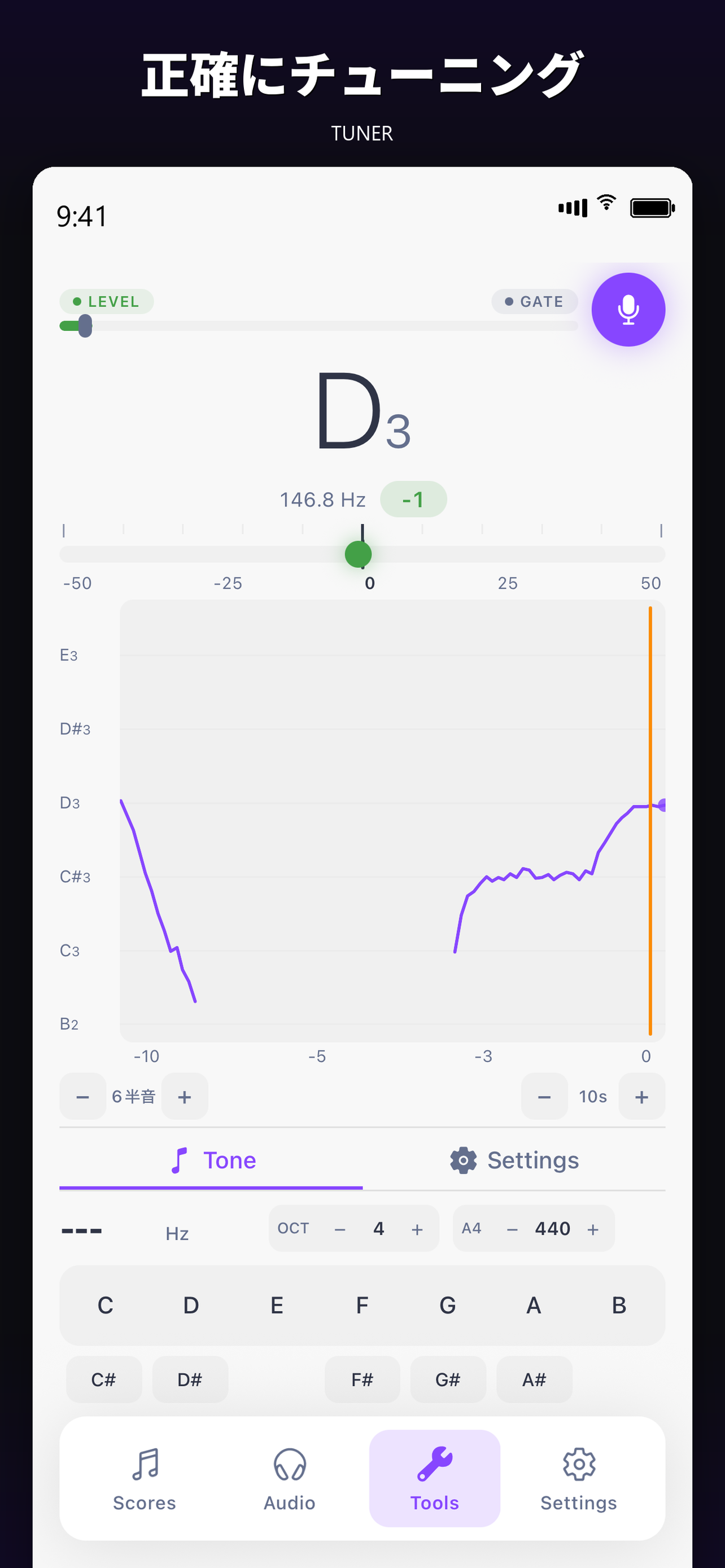
クロマティックチューナー

Chromatic Tuner

ギター・ベース・バイオリンなどのプリセット付き。基準音A4のカスタマイズや移調楽器にも対応します。

Presets for guitar, bass, violin, and more. Customize the A4 reference. Transposing instruments supported.

FREE

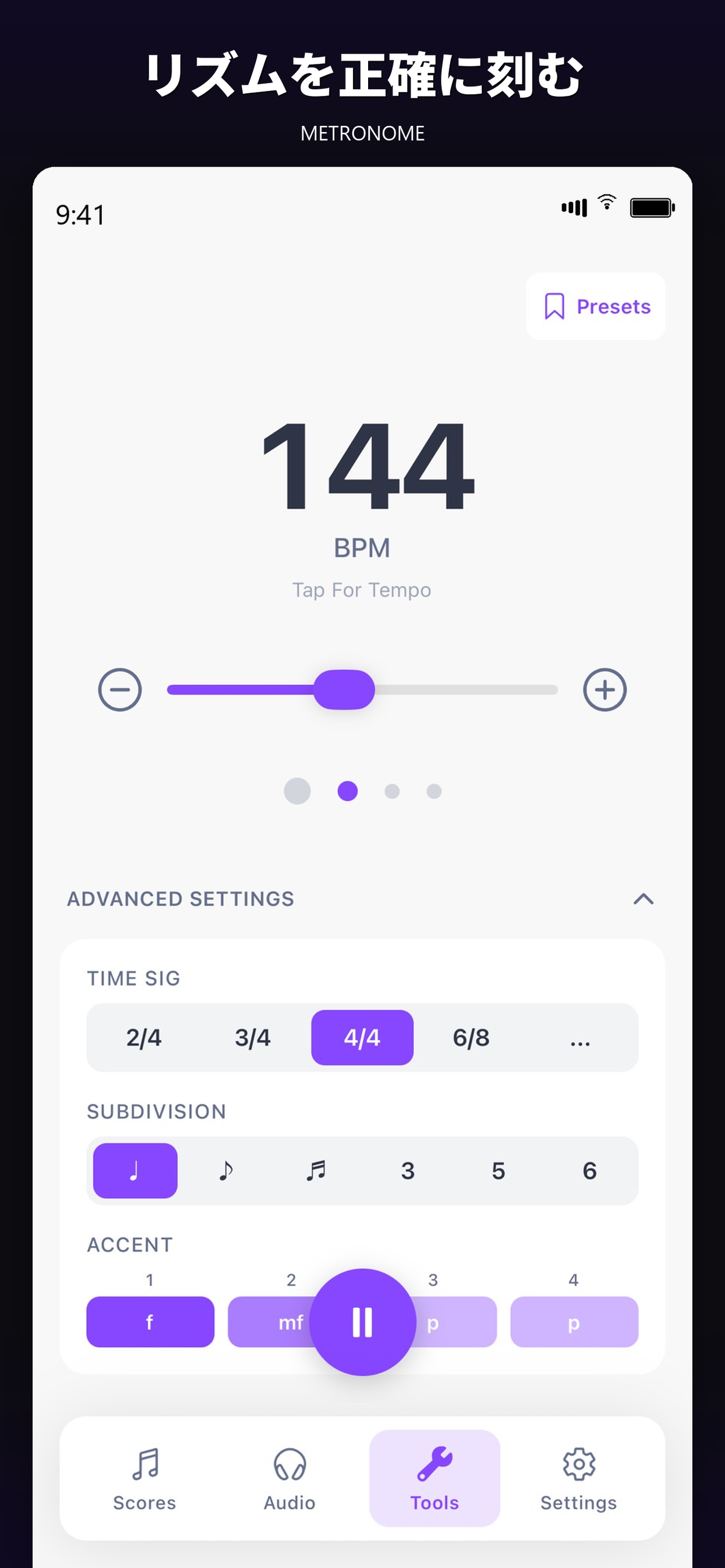
メトロノーム

Metronome

変拍子、スウィング、サイレント練習モードに対応。タップテンポや拍ごとのアクセント設定も可能です。

Odd meters, swing, silent mode. Tap tempo and per-beat accents.

FREE

譜面表示の細部調整

Score Layout Tuning

ページ表示、小節幅、五線譜の間隔、段間距離、音符間隔まで細かく調整できます。

Fine-tune page mode, measure width, staff spacing, system spacing, and note spacing.

PRO

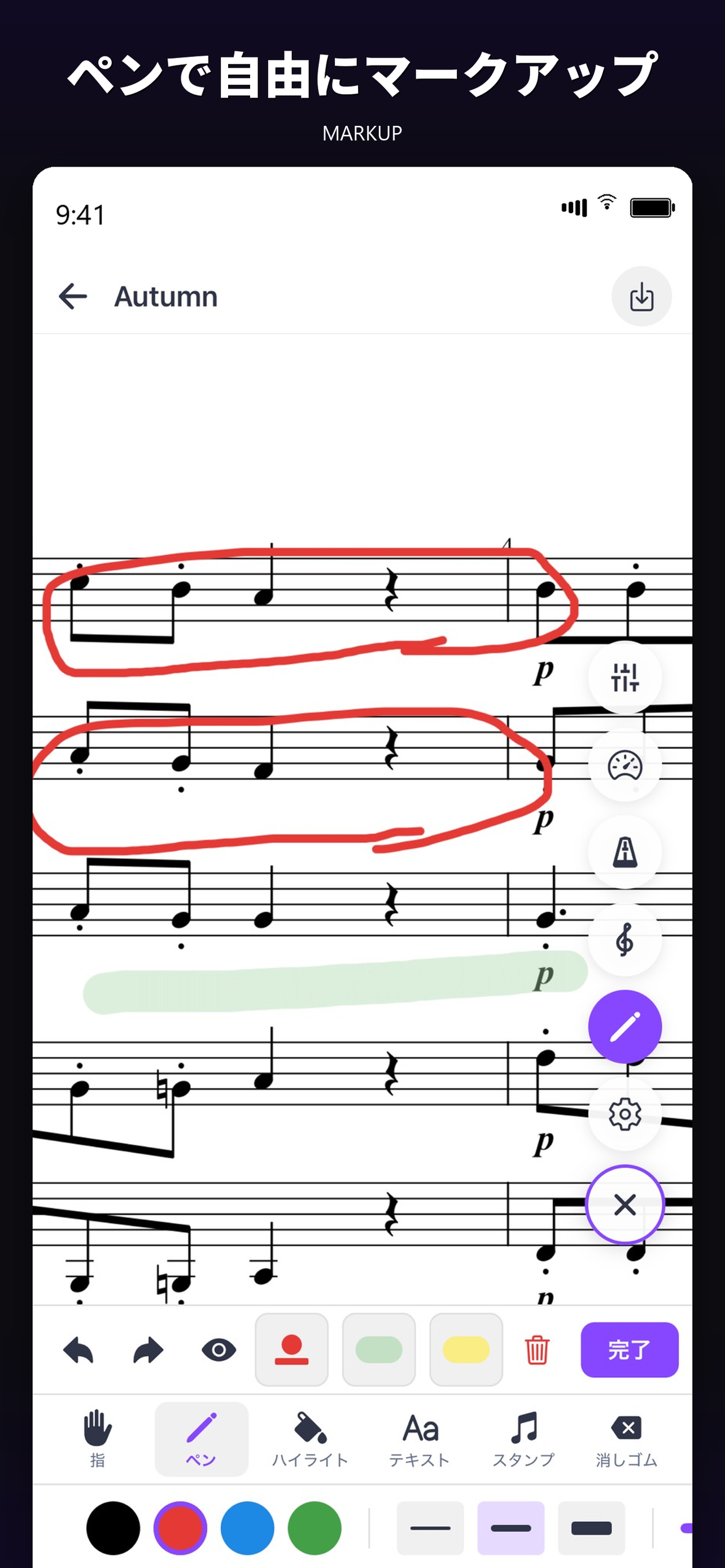
譜面への書き込み

Score Annotation

Apple Pencilまたは指で、運指やブレスを譜面に直接書き込み。次に開いたときも書き込みは残ります。

Write fingerings, breath marks, anything — Apple Pencil or finger. Annotations persist between sessions.

PRO

録音モード

Recording Mode

再生しながら自分の演奏を録音。リアルタイムでピッチを可視化して、音程の精度を確認できます。

Record yourself while the score plays. Real-time pitch visualization helps you check intonation.

PRO

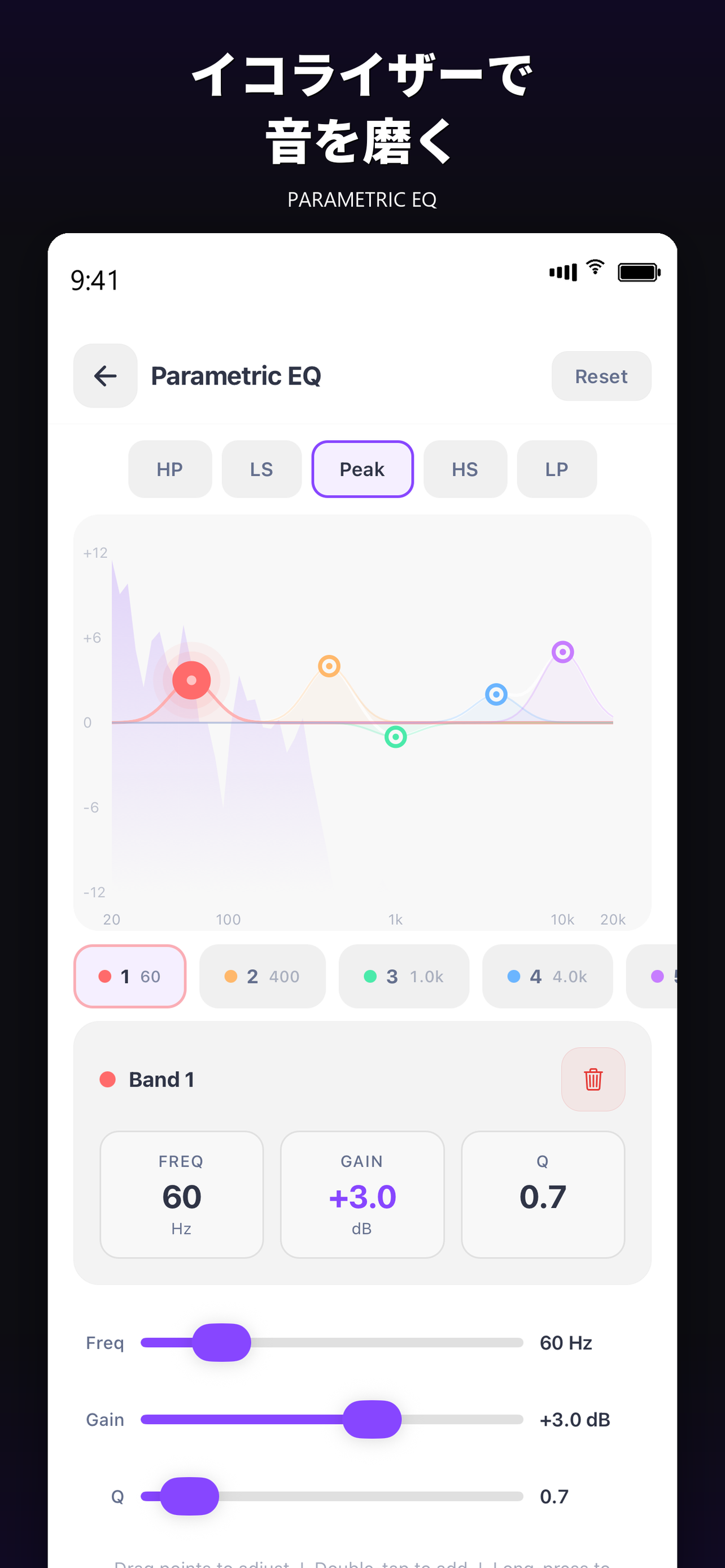
5バンドパラメトリックEQ

5-band Parametric EQ

音源の周波数バランスを細かく調整。練習用に低音や中音域を強調する、不要なノイズを削るなど自在に。

Shape the frequency balance. Emphasize bass or mids for practice. Trim unwanted noise.

PRO

40種以上のエフェクト

40+ Audio Effects

リバーブ、ディレイ、コーラス、トレモロ、コンプレッサー、リミッター、ノーマライズなど。ジャンル別プリセットも豊富。

Reverb, delay, chorus, tremolo, compressor, limiter, normalize — and more. Genre-based presets included.

PRO

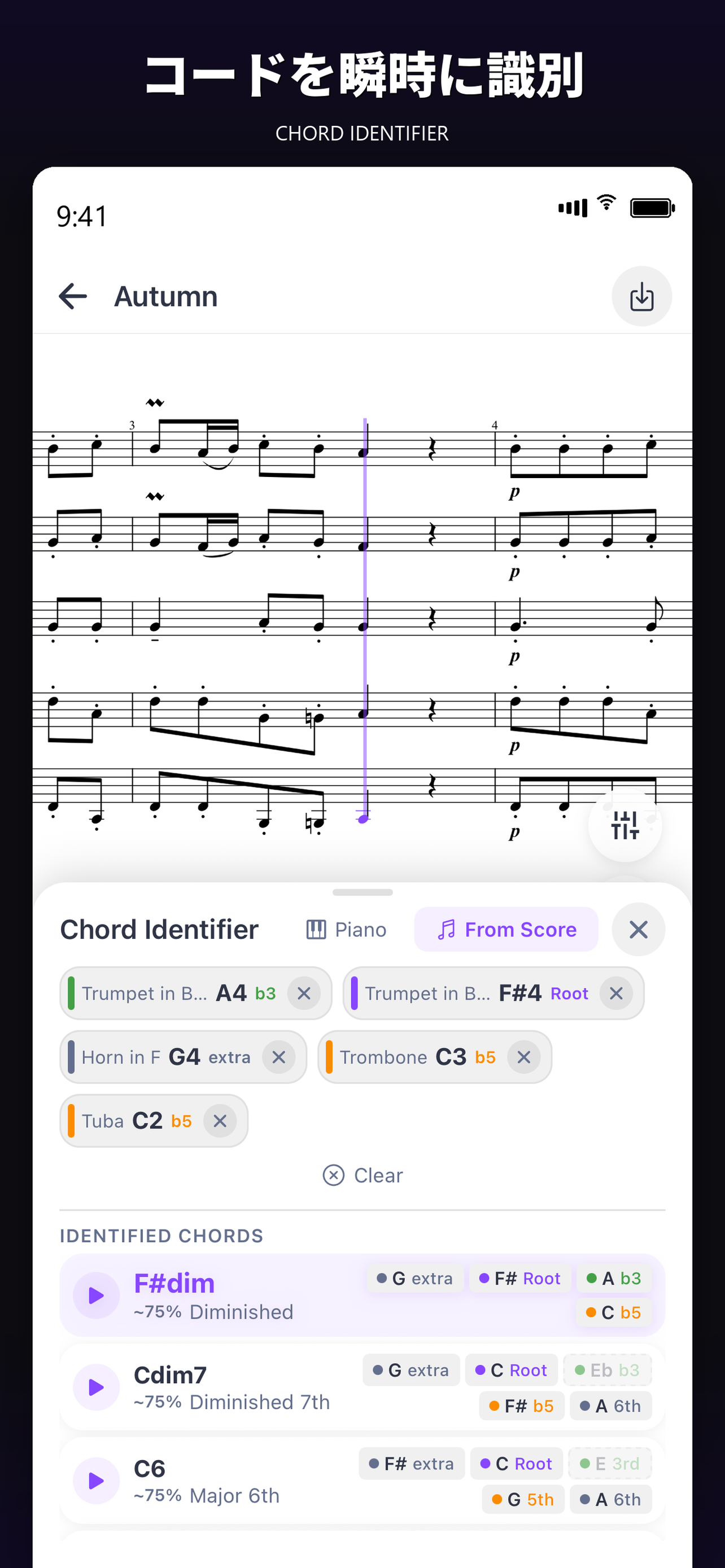
コード自動検出

Chord Auto-Detection

譜面を解析してコードを自動で表示。ダイアトニックコードや代理コードの一覧表示にも対応します。

Analyze the score and surface chords automatically. Diatonic and substitute chord listings supported.

PRO

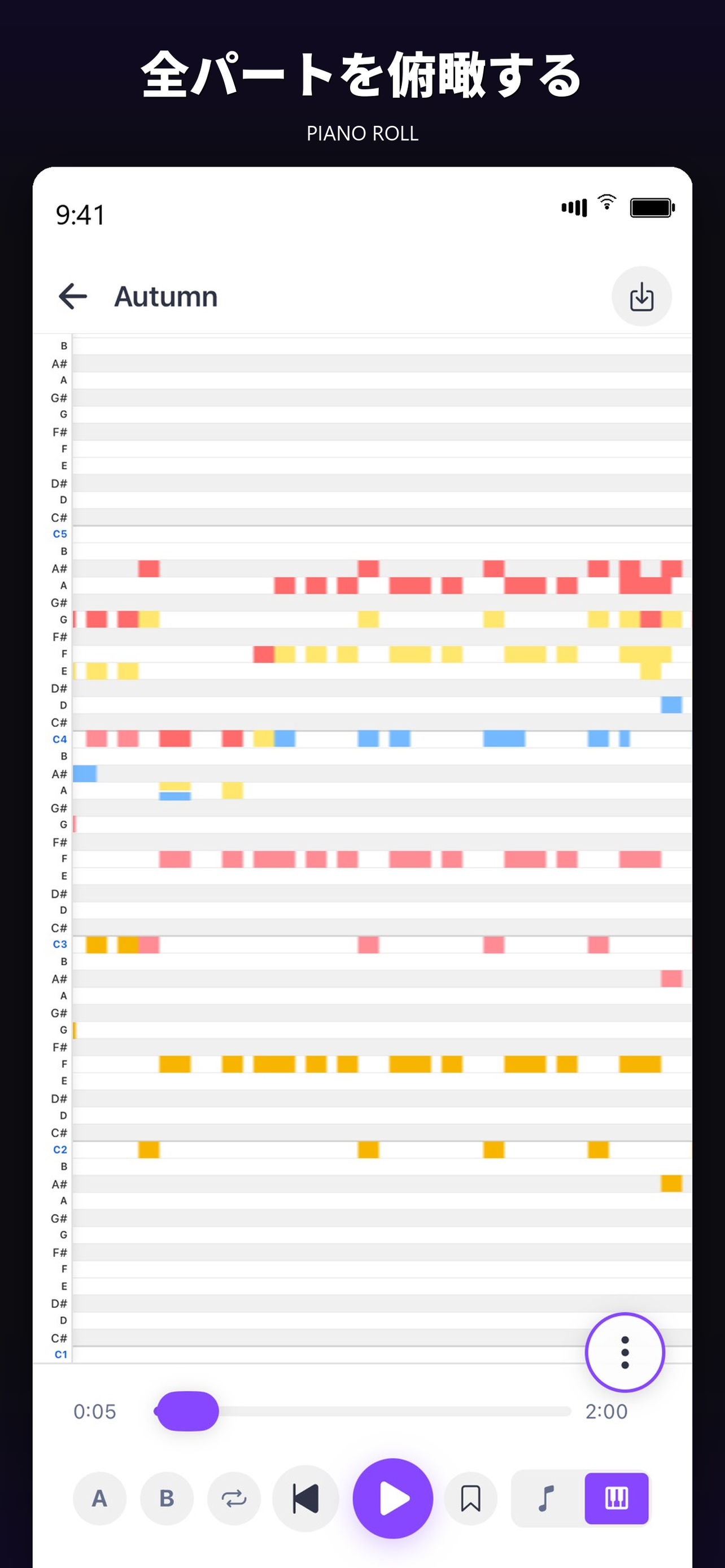
ピアノロール表示

Piano Roll View

譜面をピアノロール形式で表示。全パートを色分けされたバーで俯瞰でき、再生に同期します。

View the score as a piano roll. Color-coded bars across parts, synced to playback.

PRO

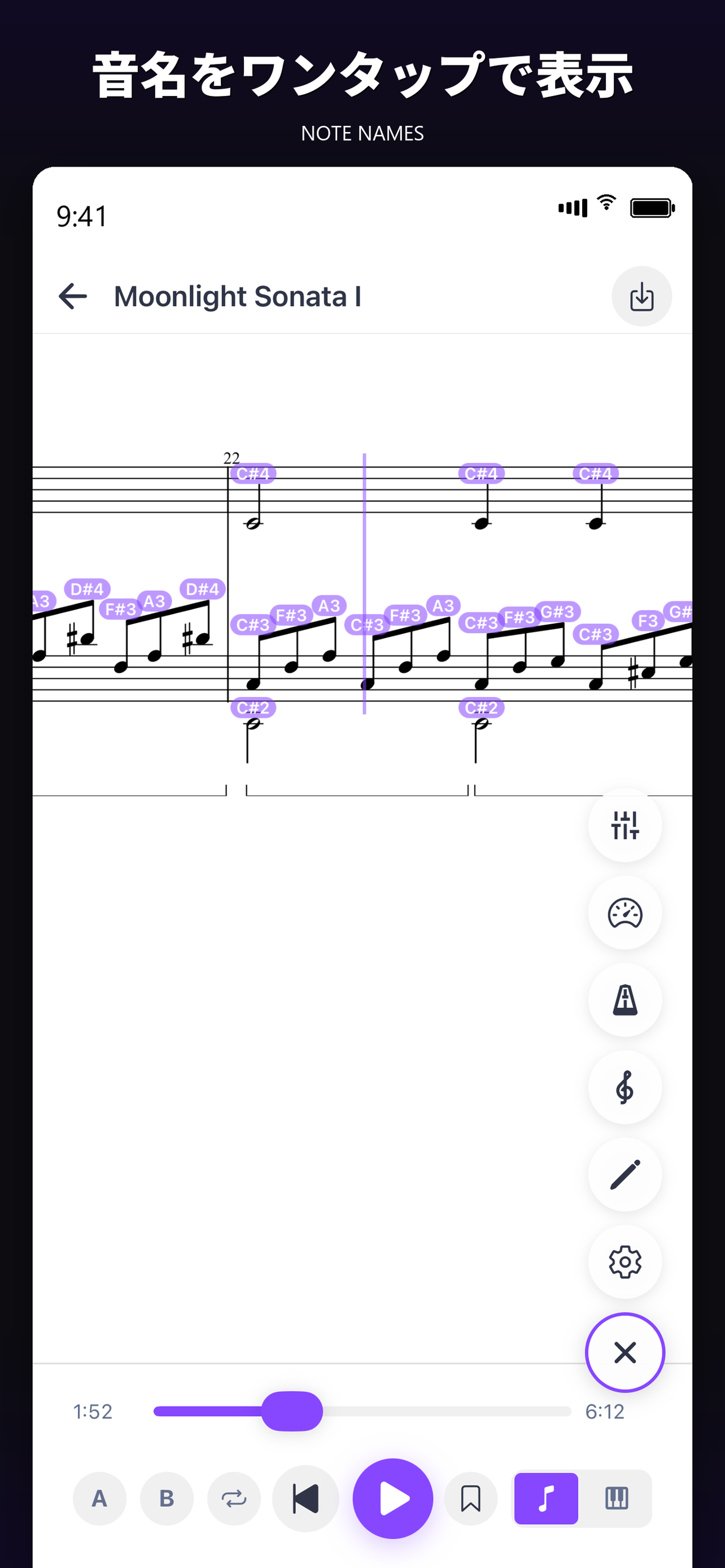
音名オーバーレイ

Note Name Overlay

音符の上に音名を重ねて表示。読譜が苦手な方や初学者の練習補助として使えます。

Overlay note names on the staff. A reading aid for newcomers.

PRO

エクスポート

Export

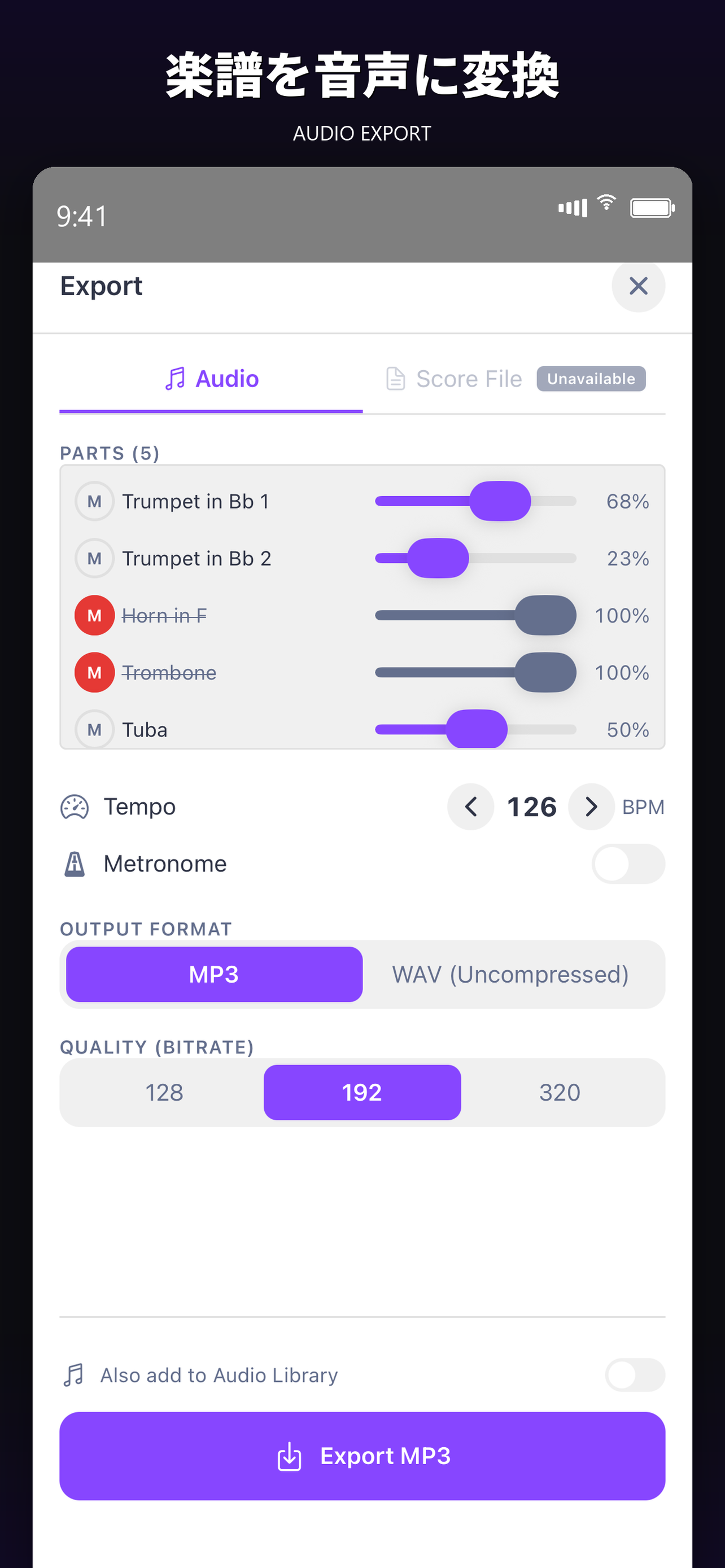
加工した音声をMP3 / WAVで書き出し。譜面はPDF / MusicXML / MIDI / MXLに変換して書き出せます。

Export processed audio as MP3 or WAV. Export scores as PDF, MusicXML, MIDI, or MXL.

PRO

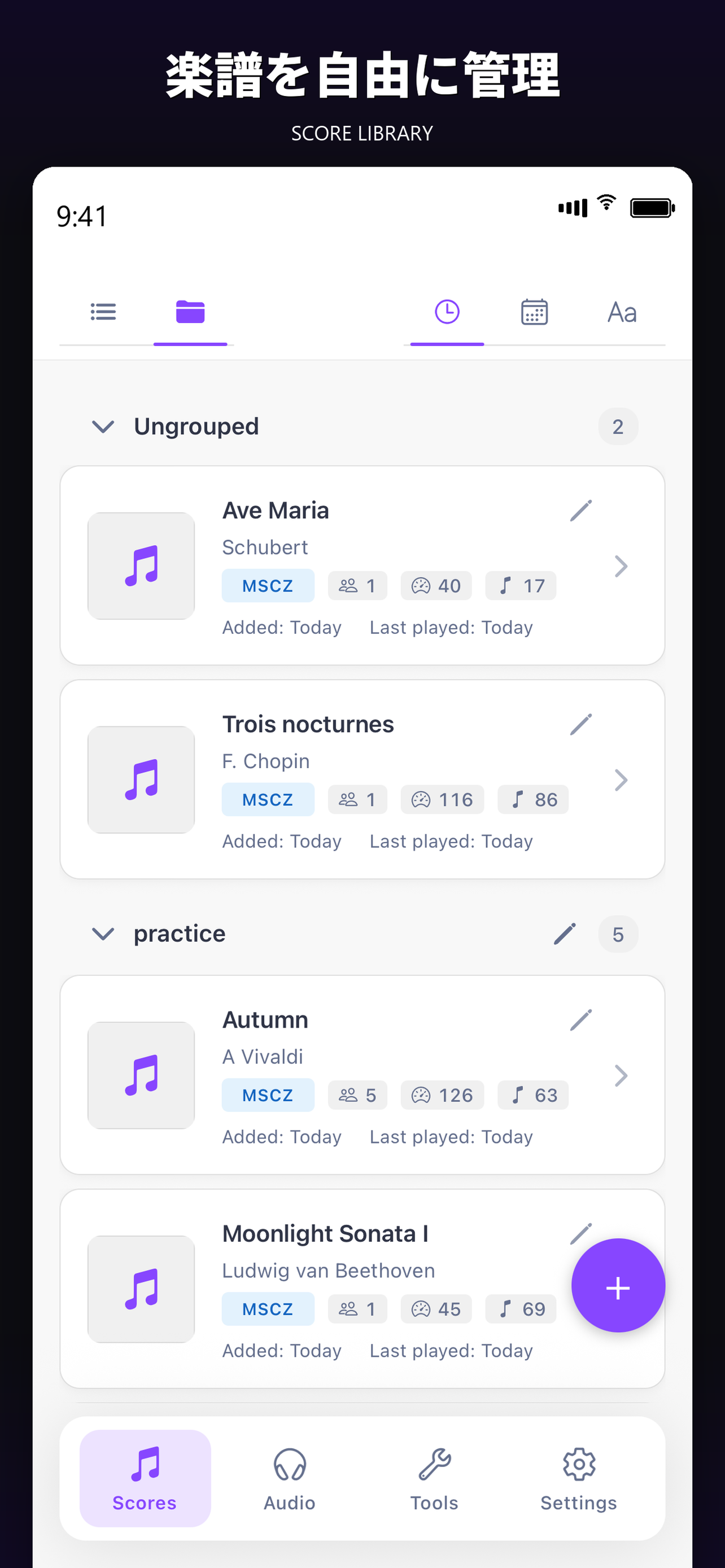
ライブラリ整理

Library Organization

グループ管理で楽譜・音声ファイルを分類。無制限にインポートできて、検索やお気に入り機能も使えます。

Group scores and audio files. Unlimited imports, search, and favorites.

COMPATIBILITY

あなたのファイルに、対応。

Works with your files.

主要な楽譜・音声・動画フォーマットをサポート。MuseScoreで作った.msczをそのまま開けます。

Supports the major score, audio, and video formats. Opens MuseScore .mscz files directly.

.mscz MusicXML (.xml / .mxl) MIDI MP3 WAV M4A FLAC OGG MP4 / MOV

WHY ETUDE

Etudeが、他とちがう3つの理由。

Three reasons Etude is different.

機能の数ではなく、機能のつながり方。練習中の体験を中心に置いて設計されています。

Not just a feature count — it's how the features connect. Designed around the experience of practicing.

01

練習に必要なツールが、
ひとつのアプリに集約

Every practice tool,
in one app.

譜面再生、テンポ調整、ループ、書き込み、チューナー、メトロノーム、音源加工。練習中に必要なものをアプリ切り替えなしで使えます。

Score playback, tempo, loop, annotation, tuner, metronome, audio processing — without switching apps.

02

無料の段階で、
練習の本質は完結する

The core of practice
is free.

楽譜の再生・パート抽出・テンポ可変・A-Bループ・チューナー・メトロノームは、すべて無料で使えます。Proは応用機能の追加です。

Score playback, part isolation, tempo, A-B loop, tuner, metronome — all free. Pro adds advanced tools.

03

譜面はあなたのデバイスに
だけ保存される

Scores live
only on your device.

完全オフラインで動作し、サーバー通信や個人データ収集はありません。アカウント登録も不要です。

Fully offline. No server traffic. No data collection. No account.

完全オフライン

Fully Offline

譜面はあなたのデバイスにだけ保存

Scores stay on your device

データ収集なし

No Data Collection

個人データの送信・解析はなし

No personal data sent or analyzed

アカウント不要

No Account

ダウンロードして即使える

Download and start

標準規格対応

Open Formats

MusicXML / MIDI / .mscz

MusicXML / MIDI / .mscz

PRICING

無料で、練習の核となる機能を全部使える。

All the core practice tools, free.

楽譜再生・パートミキサー・テンポ変更・A-Bループ・カーソル追従・バックグラウンド再生・チューナー・メトロノームは無料です。応用機能はEtude Proで使えます。

Score playback, part mixer, tempo, A-B loop, cursor follow, background playback, tuner, metronome — all free. Pro adds advanced features.

Free

¥0

アカウント登録不要・期間制限なし

No account, no time limit

  • .mscz / MusicXML / MIDI 読み込み(楽譜5個まで)
  • 音声ファイル読み込み(5個まで)
  • 全パート再生・パートミキサー
  • テンポ可変(10〜200%)
  • A-Bループ
  • カーソル追従
  • バックグラウンド再生
  • クロマティックチューナー
  • メトロノーム(変拍子対応)
  • 音声ファイルのピッチ・テンポ独立変更
  • 波形表示・ピンチズーム
  • .mscz / MusicXML / MIDI import (up to 5 scores)
  • Audio file import (up to 5 files)
  • Full playback + part mixer
  • Tempo control (10–200%)
  • A-B loop
  • Cursor follow
  • Background playback
  • Chromatic tuner
  • Metronome (odd meters supported)
  • Independent pitch / tempo for audio files
  • Waveform display, pinch zoom

FAQ

よくある質問。

Frequently asked.

無料でどこまで使えますか?

How much works for free?

楽譜再生、パートミキサー、テンポ可変、A-Bループ、カーソル追従、バックグラウンド再生、クロマティックチューナー、メトロノーム、音声ファイルの読み込みとピッチ・テンポ独立変更まで、無料で使えます。ただし、無料プランでは楽譜と音声ファイルがそれぞれ5個までという上限があります。無制限のインポート、書き込み・録音・コード自動検出・エフェクト・エクスポートなどはEtude Proで利用できます。

Score playback, part mixer, tempo, A-B loop, cursor follow, background playback, chromatic tuner, metronome, audio file loading, and independent pitch/tempo control — all free. Free plan caps at 5 scores and 5 audio files. Unlimited imports, annotation, recording, chord detection, effects, and export require Etude Pro.

MuseScore公式アプリと何が違いますか?

How is this different from the official MuseScore app?

Etudeは練習に特化した別アプリで、記譜編集機能はありません。譜面の作成や編集はデスクトップのMuseScore Studioで行うことを想定しています。その代わりA-Bループ、譜面への書き込み、バックグラウンド再生など、練習中に欲しい機能を厚く実装しています。

Etude is a separate, practice-focused app — it does not edit notation. Score creation and editing are expected to happen in MuseScore Studio on the desktop. In return, Etude doubles down on what you want during practice: A-B loop, score annotation, background playback, and more.

古い形式の.msczは開けますか?

Does it open older .mscz files?

MuseScore 4形式の.msczを推奨しています。MuseScore 3系の旧形式の一部は読めない場合があります。開けない譜面があればサポートまでお知らせください。可能な限り対応します。

MuseScore 4 .mscz files are recommended. Some MuseScore 3 files may fail to load. If you find one, please let support know — we'll try to handle it.

移調楽器(Bb / Eb / F)に対応していますか?

Are transposing instruments (Bb / Eb / F) supported?

はい、対応しています。デフォルトではin C表示に自動変換されますが、楽器ごとの実音表示への切り替えも可能です。

Yes. By default everything converts to concert pitch. You can switch back to each instrument's written pitch as needed.

譜面への書き込みは保存されますか?

Are score annotations saved?

はい、自動保存されます。次回譜面を開いたときに、書き込みが残った状態で表示されます。書き込み機能はEtude Proの機能です。

Yes, automatically. Annotations are restored the next time you open the score. Annotation is an Etude Pro feature.

Proのサブスクリプションはどう解約しますか?

How do I cancel the Pro subscription?

iOSの設定からApple ID、サブスクリプションへ進んで解約できます。7日間の無料トライアル期間中に解約すれば、課金は発生しません。

Open iOS Settings, tap your Apple ID, then Subscriptions. Cancel within the 7-day trial to avoid any charge.

Android版はありますか?

Is there an Android version?

現在はiOS版(iPhone・iPad)のみです。Android版は将来的な検討課題ですが、現時点で公開時期は未定です。

Currently iOS only (iPhone / iPad). Android is being considered, but with no announced timeline.

譜面はどこに保存されますか?

Where are my scores stored?

あなたのデバイス上にのみ保存されます。クラウドへの送信や、第三者によるアクセスはありません。完全オフラインで動作します。

Only on your device. Nothing is sent to the cloud, no third-party access. Etude runs fully offline.

LANGUAGES

8言語対応。

8 languages.

アプリは以下の言語で利用できます。譜面のテキストは元のままを保持します。

The app is available in the following languages. Score text is preserved as written.

日本語 English 한국어 简体中文 繁體中文 Deutsch Español Français

あなたの練習を、もっとラクに、もっと深く。

Make your practice easier and deeper.

無料でダウンロード · アカウント登録不要 · 完全オフライン動作

Free download · No account · Fully offline

Download on the App Store